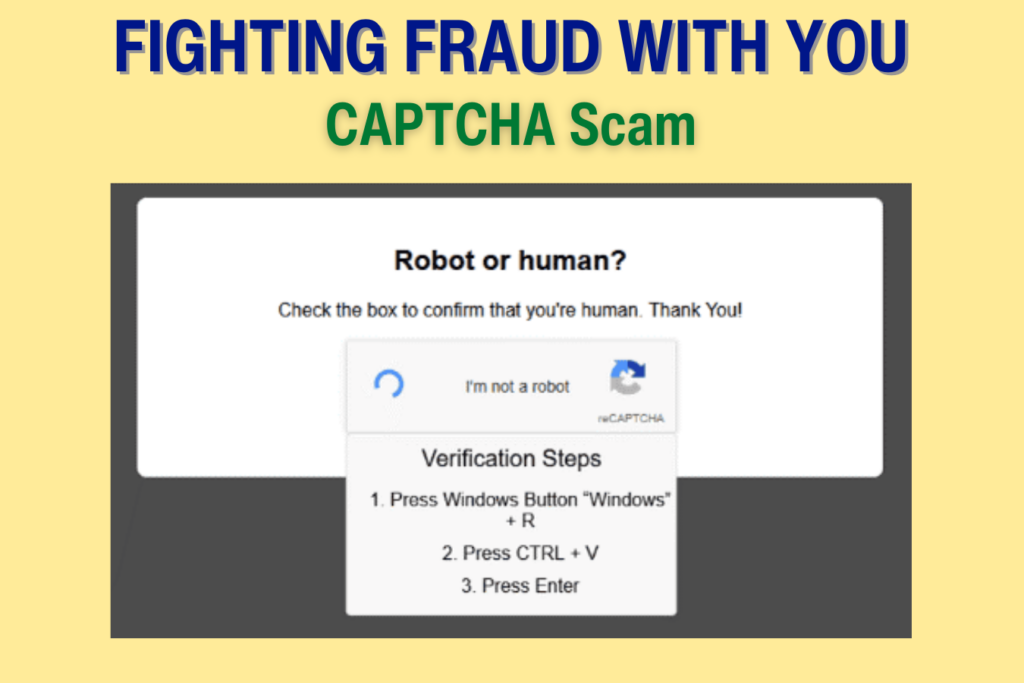
We’ve all seen those “CAPTCHA” boxes that ask you to click on pictures of traffic lights to prove you aren’t a robot. They’re annoying, but they keep sites safe. A new “bait-and-switch” captcha scam tells you there’s an error and gives you a few “simple” steps to fix it. Here’s how to avoid this scam:
– Don’t click on links – especially ones that ask you to run a command.
– Close the tab. Don’t open a “Run” box or paste code.
– Go directly to the site. Use a trusted address to visit the site.
– Create a Passkey. Passkeys are safe and aren’t subject to a data breach.
– Use multi-factor authentication (MFA) when available.
If you believe your identity or accounts have been affected by a captcha scam, contact the Identity Theft Resource Center (ITRC) for free, confidential guidance. Call or text toll-free at 888-400-5530 or use live chat on the ITRC website.